How to Apply
Apply Online
View the current job opportunities table and click on the job title you are interested in. To apply, click on the "Apply" link found on the individual job posting page.
Watch Video on Applying with Texas Parks and Wildlife - Introduction to CAPPS
First Time Applicants
If this is the first time you are applying using the online job application, create an account and select a username and password. Please note that applicants must have their own email address to apply.
Veterans
Texas state law requires agencies to give veterans, surviving spouses of veterans, and orphans of veterans preference in the selection process when candidates are similarly qualified. TPWD Human Resources specifically encourages managers to interview veterans for any job openings for which they meet minimum qualifications, and states that if skills needed in a job have been obtained through federal government service, they should be considered.
Learn more about Veteran Hiring at TPWD
Create an Application
After your account has been established, you can build a profile in CAPPS Recruit. This will allow you to create an employment application to apply for TPWD jobs.
Application Requirements
- Online applications are only accepted and only for current available positions.
- Incomplete applications will not be considered.
- All applications must contain complete job histories, which includes job title, dates of employment, name of employer, supervisor's name and phone number and a description of duties performed.
- Include all relevant education and experience.
- Work History should reflect knowledge, skills and abilities specific to each position held.
- “See attached” or “See resume” in lieu of detailed descriptions will not be considered.
- Resumes are not accepted in lieu of the application; however a resume may be attached as a supplement.
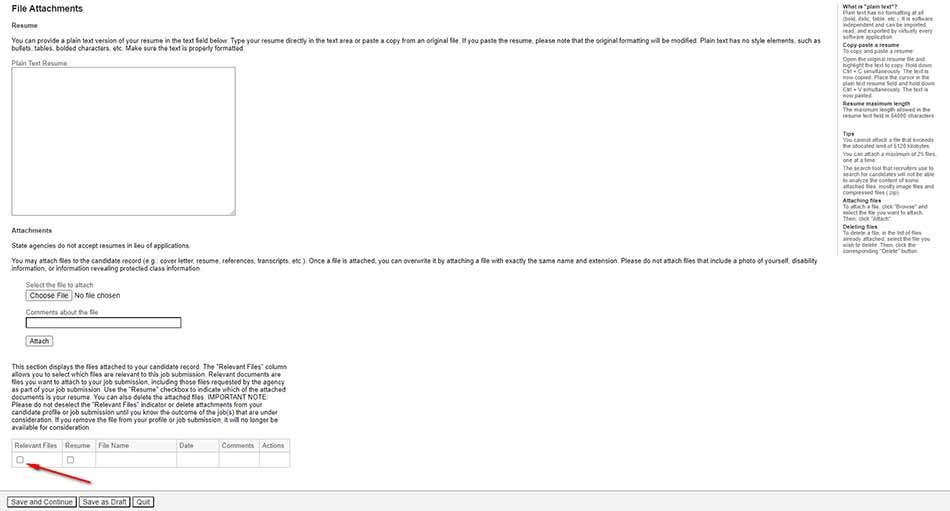
- Additional documents (college transcripts, DD214, writing samples, etc.) are often required during the application process.
- Attachments must be included by applicant per application:
After Your Application is Submitted
After you have submitted an application you will receive a confirmation email from CAPPS Recruiting acknowledging your application submission. The process can take 2 to 8 weeks from the posting close date.
Check Application Status
The status of your application can be viewed when logged into the CAPPS Recruit system. Due to the high volume of phone calls we highly recommend the application status be monitored online.
Application Status Description
| Submission Status | What does it mean? |
|---|---|
| Application received | Application was successfully submitted and received by Human Resources. Application is being screened by system to see if minimum qualifications are met. |
| Under Consideration |
|
| Not Selected | The position has been filled by another candidate. Status is seen by applicants who were and were not interviewed. |
| Offer Accepted | Candidate has been selected for this position. Status seen after applicant has accepted job offer. |
Support
For assistance call TPWD Human Resources at (512) 389-4545. Use “Forgot your user name?” to retrieve your username or “Forgot your password?” to reset your password.
The CAPPS FAQ page contains commonly asked questions about the application process.
Privacy and Accommodations
Online applications are stored on a secure site. Only authorized employees and hiring authorities have access to the information submitted. Applicants with special needs may request additional assistance or other reasonable accommodations.
The Texas Parks and Wildlife Department is an Equal Opportunity Employer and complies with the Americans with Disabilities Act. Applicants requiring reasonable accommodation for any part of the application and hiring process should contact TPWD Human Resources department by email or (512) 389-4545.
Texas Parks & Wildlife Department does not discriminate in hiring practices based on race, color, religion, sex (including pregnancy and gender), national origin, political affiliation, sexual orientation, marital status, disability, genetic information, age, membership in an employee organization, retaliation, parental status, military service or other non-merit factor.
Veterans and Former Foster Child Employment Preference
The Texas Park and Wildlife Department complies with the provisions of the veterans and former foster child employment preference acts.
General Information
- Authorization and Consent for Disclosure of Criminal History Information – PWD 1039
 (Word 75.5 KB)
 - Authorization and Consent for Disclosure of Criminal History Information – PWD 1039 (PDF 118 KB)